The restaurant POS that survives the lunch rush
Run dine-in, takeaway and delivery from one place. Manage tables, orders, kitchen tickets, payments, customers and riders without switching between systems. Built in Dhaka for restaurants in Bangladesh and around the world.
15 days free · No card required · Setup help on WhatsApp
BANGLADESH FIRST, READY WORLDWIDE
Built for restaurants in Bangladesh, ready for restaurants anywhere
Algonize is made in Dhaka by Algoramming Systems Ltd. It covers the parts of restaurant work that generic POS tools often miss: several payment types on one bill, tax and service charge on every receipt, and thermal printing for the counter and the kitchen. Outside Bangladesh, it works the same way: sell in your local currency, set your own tax rate, and pay for your plan in USD.

Local and global payments
Record cash, card, bank transfer, cash on delivery or mobile wallets such as bKash and Nagad on every bill. Advance and partial payments stay on the order.

VAT or GST, at any rate
Set your VAT, GST or sales tax rate and service charge per branch. They apply to every bill and print on the receipt, with tax numbers such as BIN and TIN.

Thermal printing, no drivers
Counter receipts and kitchen slips in 58, 72 or 80mm on any ESC/POS thermal printer over Wi-Fi.

Works in any country
Cloud software with nothing to install. Print receipts in English or in Arabic and English, and pay for your plan in BDT or USD.
PRODUCT WALKTHROUGH
See how Algonize handles a restaurant order
These are real screens from the Algonize apps, following one order from the counter to the customer's door.
 STEP 01
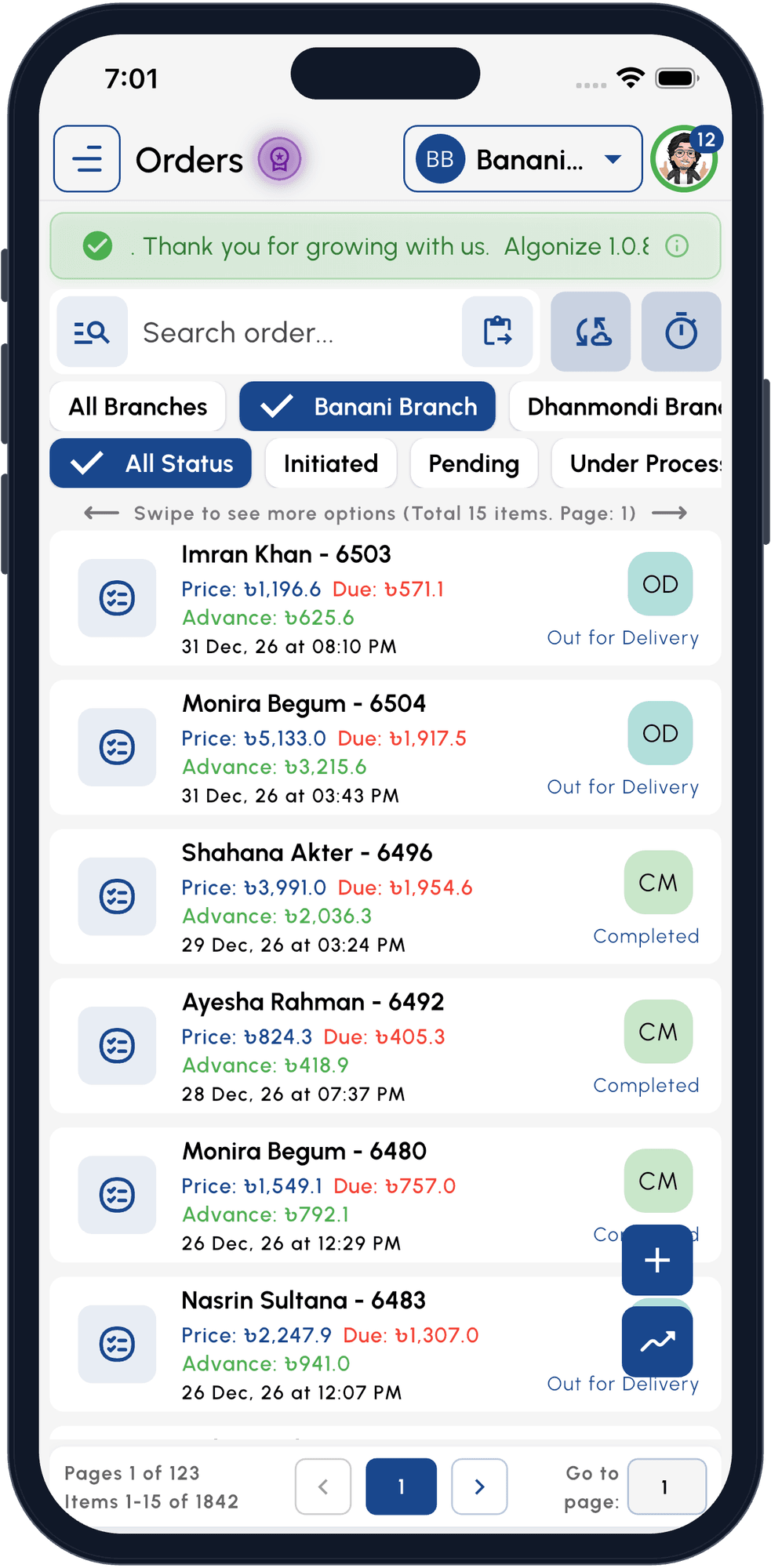
Take and track every order
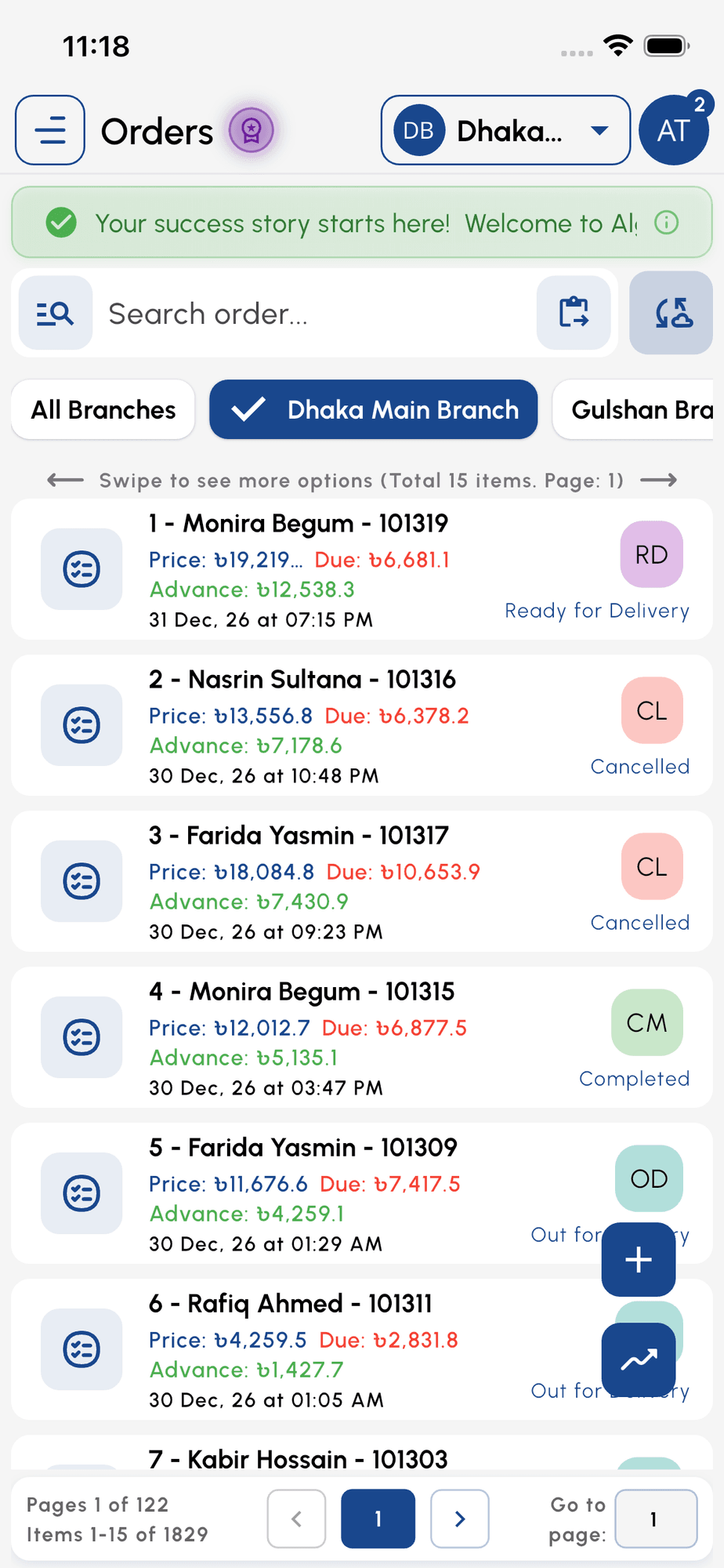
Dine-in, takeaway and delivery orders sit in one list with price, advance and due, filtered by branch and status.
 STEP 02
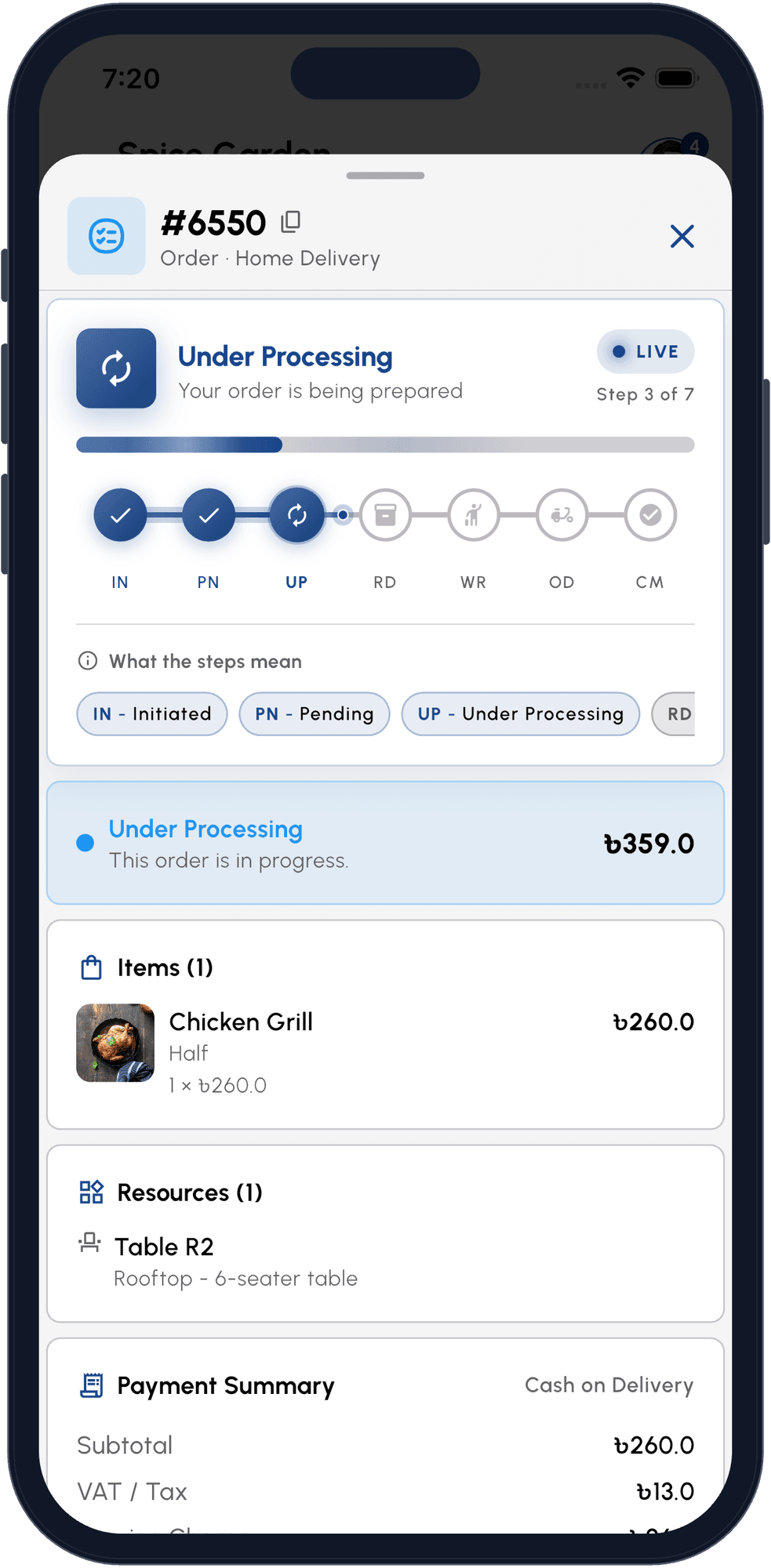
Follow it through the kitchen
Each order moves from Initiated to Pending, Under Processing and Ready, with the table, items, VAT and payment on one screen.
 STEP 03
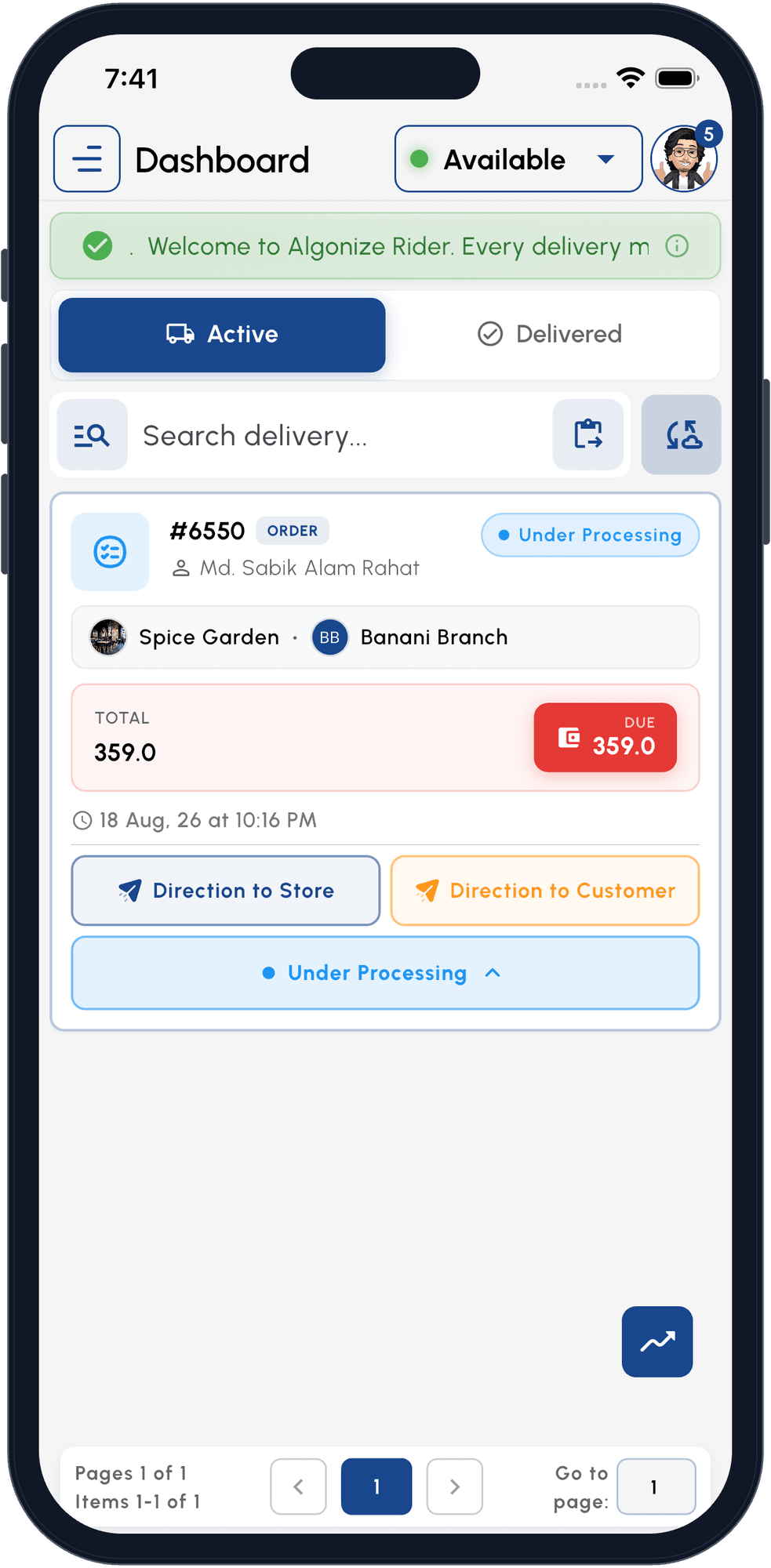
Hand it to a rider
Your rider sees the order, the amount to collect and one-tap directions to the restaurant and to the customer.
 STEP 04
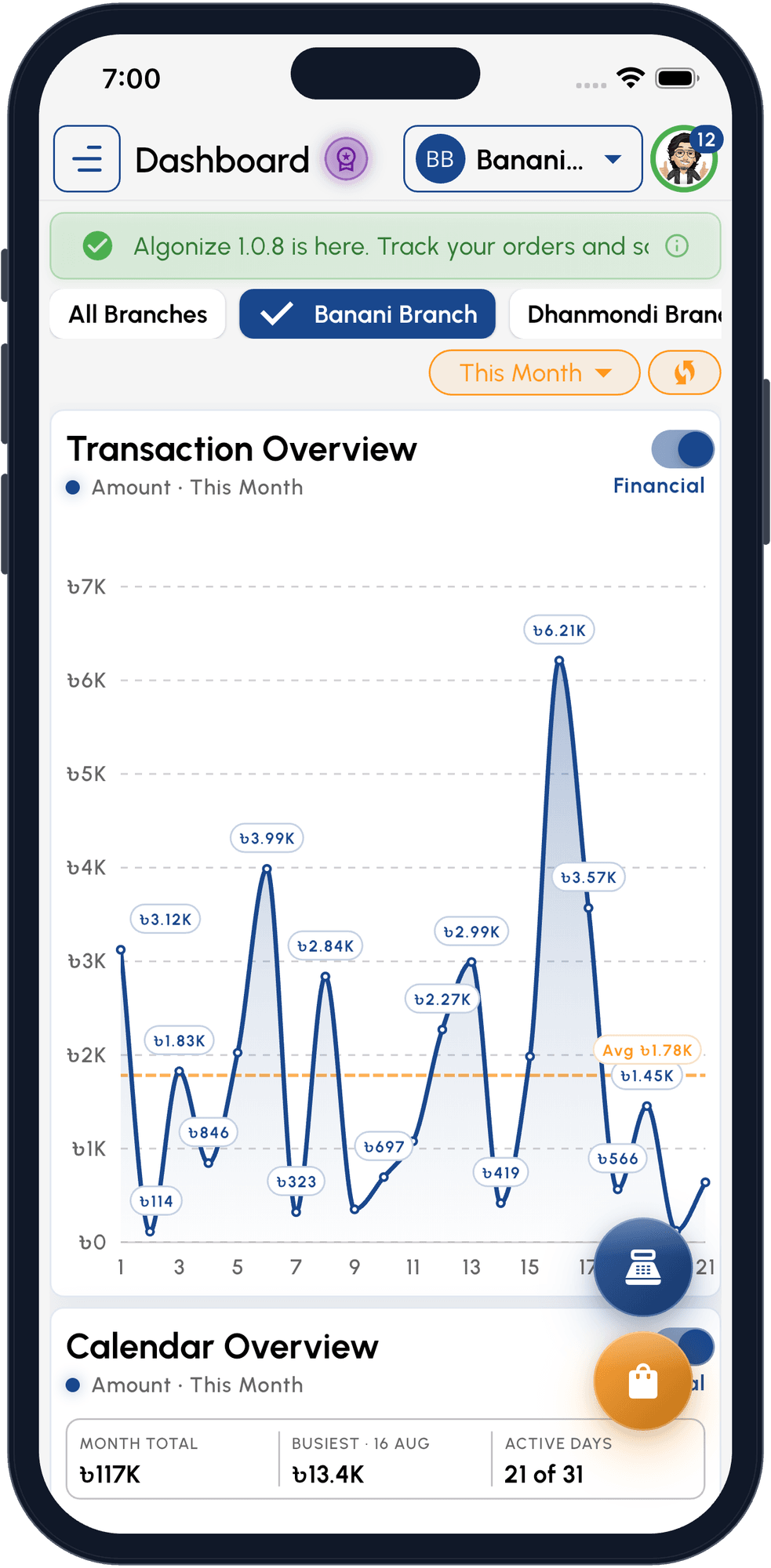
See how the day went
Daily sales per branch, month totals and your busiest days, updated as orders are paid.
What is Algonize restaurant POS software?
Algonize is restaurant POS and management software made by Algoramming Systems Ltd. in Dhaka, Bangladesh, for restaurants in Bangladesh and worldwide. It brings dine-in, takeaway and delivery orders into one system, so a restaurant can take orders, print kitchen slips, manage tables, dispatch riders and collect payment with bKash, Nagad, card or cash from the same screen.
It runs on Android, iOS, Windows, macOS and the web, and keeps every device and branch in sync in real time. Owners see sales, customers and best-selling items as they happen, set VAT and service charge per branch, and print to any ESC/POS thermal printer over Wi-Fi. It suits a single café as well as a growing chain.
Compare plans in the restaurant POS pricing section, read about POS software in Bangladesh, learn who builds Algonize, or book a restaurant POS demo.
Everything your restaurant runs on, in one system

Restaurant POS
Fast billing for dine-in, takeaway and delivery, with a quick-order mode for the lunch rush and several open tabs at once, one per table.

Table management
Tables are bookable resources. Assign an order to a table, see which tables are busy and switch between open table orders without losing anything.

Kitchen tickets and printing
Print a kitchen copy without prices while the receipt waits at the counter. Menu items carry prep times, so the times you quote stay honest.
Online ordering
Your menu goes live on your own storefront and in the Algonize Customer app. Pickup and delivery orders arrive in Portal with a sound alert.

Delivery and riders
Assign one of your riders, follow each order's status live and see the cash they need to collect, from kitchen to doorstep.

Customers, loyalty and promotions
Keep customer profiles and order history, reward regulars with points, and run promo codes with expiry and minimum-spend rules.

Reports and accounting
Daily sales, best-selling items and branch totals, with double-entry accounting and PDF or Excel exports.

Multi-branch management
Run every outlet from one account with per-branch staff roles, VAT settings and online ordering status, and see sales across all of them.
HOW IT WORKS
From table to kitchen to doorstep
Take the order
Create a dine-in, takeaway or delivery order from the POS, with add-ons and the table number built in.
Send it to the kitchen
A kitchen slip prints on your thermal printer while the receipt waits at the counter. No writing the order twice.
Serve or dispatch
Track each order as it is prepared, served, picked up or handed to a rider and delivered.
Get paid and learn
Settle by card, cash, bKash or Nagad, then see sales, customers and best sellers in your reports.
WHY SWITCH
One system instead of separate tools
Many restaurants run on a billing machine, a notebook, phone calls and a messaging group. Algonize puts those jobs in one place.
| Common restaurant setup | With Algonize |
|---|---|
| Separate POS and online ordering tools | POS, storefront and Customer app share one order list |
| Orders written down or shouted to the kitchen | Kitchen slips print from the order |
| Customer numbers kept in a notebook | Customer profiles with order history |
| Riders coordinated over phone calls | Rider app with live status and cash to collect |
| Promotions tracked by hand | Loyalty points and promo codes |
| End-of-day totals on a calculator | Sales reports and accounting, updated live |
| Each branch run on its own | Every branch in one account |
WHO IT IS FOR
Built for every kind of food business
Full-service restaurants
Table management, prep-time menus and kitchen tickets for a busy dining room.
Cafés & coffee shops
Quick-order checkout for high footfall, with loyalty points that bring regulars back.
Fast food & takeaway
Rapid tap-and-go orders, pickup timing and thermal receipts built for speed.
Cloud & home kitchens
Delivery-first orders with rider dispatch and live order status from kitchen to doorstep.
Bakeries & dessert shops
Sell by item, run promos and track daily stock across counters and branches.
Multi-outlet chains
Consolidated sales, per-branch settings and staff roles keep every location consistent.
YOUR MENU, ONLINE
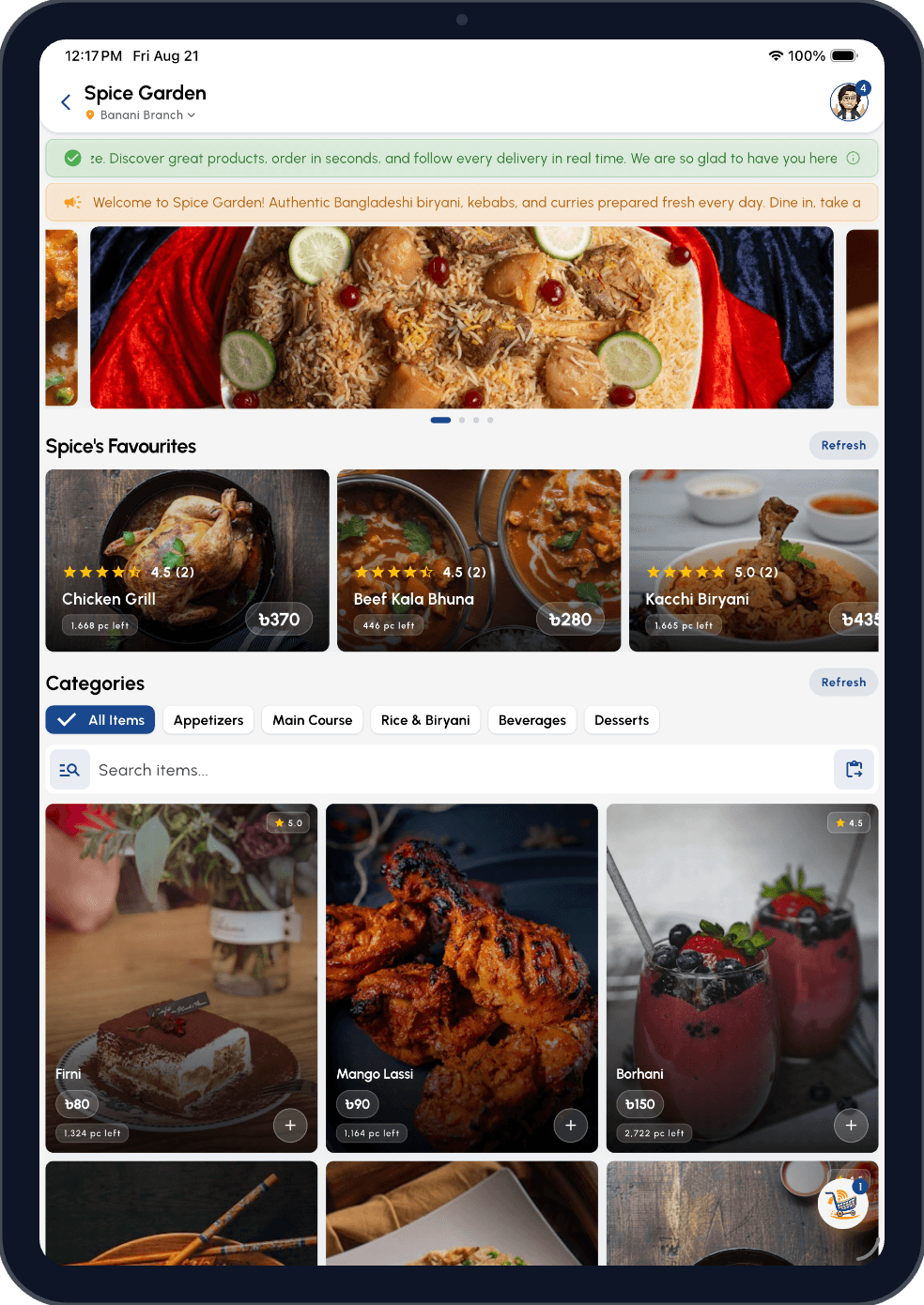
Let diners order from your branded storefront
Your live menu shows up in your own branded storefront and in the Algonize Customer app. Guests order for pickup or delivery, the order lands in Portal with a sound alert, and your staff print the kitchen ticket in one tap.
- Your storefront at <username>.algonize.xyz, live in minutes
- Customers pick pickup or home delivery at checkout
- Orders drop straight into Portal, ready to print for the kitchen
- Diners follow their order status and earn loyalty points in the Customer app





PRICING
Restaurant POS pricing
Start with a 15-day free trial, no card required. After that, pay monthly or yearly in BDT or USD. Every plan includes POS, tables, kitchen printing, delivery and reports. Not sure which plan fits? Book a demo and we will help you choose.
Offer activeDiscounted prices until 31 Oct 2026.
Plan: PremiumMonthly
- Full multi-branch support (up to 5 locations)included
- Process up to 700 sales & orders monthlyincluded
- Support up to 15 management usersincluded
- High-capacity inventory & categoriesincluded
- Manage up to 50 employees & 20 ridersincluded
- Advanced business analytics & reportingincluded
- Priority performance & reliabilityincluded
- Subtotal
- $39.00
- Offer -37%
- -$14.50
- Yearly would save
- $49.00
- Total
- $24.50 per month
Billed monthly
Offer ends 31 Oct 2026
Thank you
BOOK A DEMO
See Algonize with your restaurant setup
We will walk you through POS, tables, kitchen orders, payments, delivery and reporting in about 10 minutes, using your menu and branches as the example. Pick a time that suits you on our booking calendar, or email support@algoramming.com.
- POS and billing
- Tables
- Kitchen printing
- Payments
- Delivery and riders
- Reports
Prefer WhatsApp?
Ask us anything about setup, pricing or how Algonize works for your restaurant. You will be chatting with the Algonize team directly.
Chat with Us on WhatsAppQUESTIONS
Restaurant POS questions, answered
Algonize is restaurant POS and business management software by Algoramming Systems Ltd., a software company in Dhaka, Bangladesh. Restaurants use it to run dine-in, takeaway and delivery orders, tables, kitchen printing, payments, customers and reports from one system on a phone, tablet, computer or the web.
Restaurant POS software takes orders, sends them to the kitchen, prints bills and records payments. Algonize does all of that and also covers tables, online orders, delivery riders, customer loyalty and sales reports, so a restaurant does not need a separate tool for each job.
Yes. Dine-in, takeaway (pickup) and delivery orders share one order list. Dine-in orders can be assigned to a table, and staff can keep several table orders open at once and switch between them.
Yes. Mark an order for home delivery, assign one of your riders and follow its status live, from Ready for Delivery to Out for Delivery to Completed. Riders use the free Algonize Rider app to see the address, the amount to collect and directions, and customers can track the order in the Customer app. Algonize manages your own riders; it is not a third-party delivery service.
Yes. One account can run several branches. Each branch has its own staff roles, VAT and charge settings and online ordering status, while the owner sees orders and sales across every branch.
Yes. Every bill records how it was paid: cash, card, mobile banking such as bKash or Nagad, bank transfer, cheque, cash on delivery or online. Advance and partial payments are tracked on each order, and the due is collected in one tap. A connected online payment gateway can be set up for your business on request.
Yes. Algonize is cloud software that works in any country, with nothing to install. Your business sells in the currency of the country you choose at sign-up. Set your own VAT, GST or sales tax rate, record card, cash and other payments, print receipts in English or in Arabic and English, and pay for your plan in USD. Support is by WhatsApp, phone and email in English or Bangla.
Yes. Algonize prints to ESC/POS thermal printers in 58, 72 and 80mm over Wi-Fi with no driver setup. Print the customer receipt at the counter and a kitchen copy without prices for the cooks.
Yes. Set your VAT, GST or sales tax percentage and service charge per branch and Algonize adds them to every bill, shows them on the receipt and invoice, and can print tax numbers such as BIN and TIN. In Bangladesh, Algonize is not an NBR-certified EFD or SDC device, so check with your VAT adviser if your outlet is required to use one.
Algonize has Standard, Premium and Business plans, paid monthly or yearly in BDT or USD, and yearly billing costs less than paying month by month. Current prices are listed in the pricing section of this page, and every plan starts with a 15-day free trial.
Yes. Every new account gets 15 days free with no card required. You can set up your menu, tables and printers and take real orders during the trial, then choose a plan.
Yes. Tap Book a 10-Minute Demo and pick a time on our booking calendar, or message the Algonize team on WhatsApp at +880 1400-629698. We will walk you through POS, tables, kitchen printing, payments, delivery and reports using your own restaurant setup.
Yes. Build a catalog of add-ons such as extra cheese, a drink or a side, and attach them to the menu items that offer them. Staff at the till and customers in the app add them to an order, they join the subtotal so VAT and service charge apply, and they print under each item on the receipt.
Algonize for every counter
 Retail POS
 Tailoring
 Services & Delivery
Ready to simplify your restaurant operations?
Start with a 15-day free trial or book a quick demo to see how Algonize fits your restaurant's workflow.
Plus free apps for your customers and riders